
Veja nesta dica como redimensionar uma imagem no disco, proporcionalmente a uma largura pré-definida. É um método bastante útil quando se tem, por exemplo, um servidor web que recupera imagens de um banco de dados, mas precisa exibir ao usuário somente as miniaturas, e posteriormente a imagem em seu tamanho real.
Demonstrando
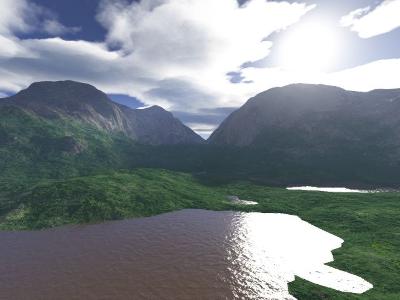
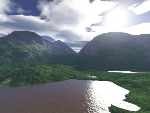
Antes de ser manipulada, ela possuía 400×300 pixels, com um tamanho de 15,7 KBytes. Após o redimensionamento com largura máxima de 150 pixels, passou a ter uma resolução de 150×113 e apenas 2,52 KBytes, veja:
Vamos ao exemplo
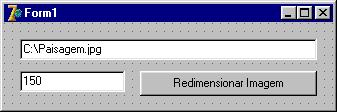
Em uma nova aplicação, adicione ao formulário duas Edits e um Button.
Acrescente ao uses, a unit JPEG.
Declare um novo tipo, logo abaixo do já existente, TForm1:
...
TForm1 = class(TForm)
    Button1: TButton;
    Edit1: TEdit;
    Edit2: TEdit;
  private
    { Private declarations }
  public
    { Public declarations }
  end;

type
  TRGBArray = array[Word] of TRGBTriple;
  pRGBArray = ^TRGBArray;

var
  Form1: TForm1;
...
Agora, declare as funções, na seguinte ordem:
...
implementation

{$R *.dfm}

function LoadJPEGPictureFile(Bitmap:TBitmap;FilePath,FileName:string):Boolean;
var
  JPEGImage: TJPEGImage;
begin
  if (FileName = '') then
    Result := False
  else
  begin
    try
      JPEGImage := TJPEGImage.Create;
      try
        JPEGImage.LoadFromFile(FilePath + FileName);
        Bitmap.Assign(JPEGImage);
      finally
        JPEGImage.Free;
      end;
    except
      Result := False;
    end;
  end;
end;

function SaveJPEGPictureFile(Bitmap: TBitmap; FilePath,FileName:string;
  Quality: Integer): Boolean;
begin
  Result := True;
  try
    if ForceDirectories(FilePath) then
    begin
      with TJPegImage.Create do
      begin
        try
          Assign(Bitmap);
          CompressionQuality := Quality;
          SaveToFile(FilePath + FileName);
        finally
          Free;
        end;
      end;
    end;
  except
    raise;
    Result := False;
  end;
end;

procedure SmoothResize(Src, Dst: TBitmap);
var
  x, y: Integer;
  xP, yP: Integer;
  xP2, yP2: Integer;
  SrcLine1, SrcLine2: pRGBArray;
  t3: Integer;
  z, z2, iz2: Integer;
  DstLine: pRGBArray;
  DstGap: Integer;
  w1, w2, w3, w4: Integer;
begin
  Src.PixelFormat := pf24Bit;
  Dst.PixelFormat := pf24Bit;

  if (Src.Width = Dst.Width) and (Src.Height = Dst.Height) then
    Dst.Assign(Src)
  else
  begin
    DstLine := Dst.ScanLine[0];
    DstGap := Integer(Dst.ScanLine[1]) - Integer(DstLine);

    xP2 := MulDiv(pred(Src.Width), $10000, Dst.Width);
    yP2 := MulDiv(pred(Src.Height), $10000, Dst.Height);
    yP := 0;

    for y := 0 to pred(Dst.Height) do begin
      xP := 0;

      SrcLine1 := Src.ScanLine[yP shr 16];

      if (yP shr 16 < pred(Src.Height)) then
        SrcLine2 := Src.ScanLine[succ(yP shr 16)]
      else
        SrcLine2 := Src.ScanLine[yP shr 16];

      z2 := succ(yP and $FFFF);
      iz2 := succ((not yp) and $FFFF);
      for x := 0 to pred(Dst.Width) do begin
        t3 := xP shr 16;
        z := xP and $FFFF;
        w2 := MulDiv(z, iz2, $10000);
        w1 := iz2 - w2;
        w4 := MulDiv(z, z2, $10000);
        w3 := z2 - w4;
        DstLine[x].rgbtRed := (SrcLine1[t3].rgbtRed * w1 +
          SrcLine1[t3 + 1].rgbtRed * w2 +
          SrcLine2[t3].rgbtRed * w3 + SrcLine2[t3+1].rgbtRed * w4) shr 16;
        DstLine[x].rgbtGreen :=
          (SrcLine1[t3].rgbtGreen * w1 + SrcLine1[t3 +1].rgbtGreen * w2 +

          SrcLine2[t3].rgbtGreen*w3+SrcLine2[t3+1].rgbtGreen * w4) shr 16;
        DstLine[x].rgbtBlue := (SrcLine1[t3].rgbtBlue * w1 +
          SrcLine1[t3 + 1].rgbtBlue * w2 +
          SrcLine2[t3].rgbtBlue * w3 +
          SrcLine2[t3 + 1].rgbtBlue * w4) shr 16;
        Inc(xP, xP2);
      end;
      Inc(yP, yP2);
      DstLine := pRGBArray(Integer(DstLine) + DstGap);
    end;
  end;
end;
Continua o código….
procedure ResizeImage(FileName: string; MaxWidth: Integer);
var
  OldBitmap: TBitmap;
  NewBitmap: TBitmap;
  aWidth: Integer;
  JPEGImage: TJPEGImage;
begin
  JPEGImage := TJPEGImage.Create;
  JPEGImage.LoadFromFile(FileName);
  OldBitmap := TBitmap.Create;
  try
    OldBitmap.Assign(JPEGImage);
    aWidth := OldBitmap.Width;
    begin
      aWidth := MaxWidth;
      NewBitmap := TBitmap.Create;
      try
        NewBitmap.Width := MaxWidth;
        NewBitmap.Height := MulDiv(MaxWidth,OldBitmap.Height,OldBitmap.Width);
        SmoothResize(OldBitmap, NewBitmap);
        RenameFile(FileName, ChangeFileExt(FileName, '.$$$'));
        if SaveJPEGPictureFile(NewBitmap, ExtractFilePath(FileName),
          ExtractFileName(FileName), MaxWidth * 2) then
          DeleteFile(ChangeFileExt(FileName, '.$$$'))
        else
          RenameFile(ChangeFileExt(FileName, '.$$$'), FileName);
      finally
        NewBitmap.Free;
      end;
    end;
  finally
    OldBitmap.Free;
  end;
end;
Pronto! Basta rodar, informar o caminho da imagem corretamente, o tamanho máximo desejado e clicar sobre o botão. Feito isso, confira seu arquivo final e veja como ficou o resultado!
Observações
- A rotina não exclui a imagem original!! Ela fica salva na mesma pasta com a extensão .$$$;
- Esta função também pode ser utilizada para aumentar a imagem, entretanto, como em qualquer ampliação de bitmaps, a qualidade pode ficar comprometida;
Créditos:
Fonte: Active Delphi
Kelver Merlotti – Coordenador editorial do portal ActiveDelphi.com.br
procedure SmoothResize
———-
DstGap := Integer(Dst.ScanLine[1]) – Integer(DstLine);
[DCC Error] F_Principal.pas(305): E2014 Statement expected, but expression of type ‘Integer’ found
———-
if (yP shr 16 < pred(Src.Height)) then
[DCC Error] F_Principal.pas(316): E2029 ‘)’ expected but identifier ‘lt’ found
———-
w1 := iz2 – w2;
[DCC Error] F_Principal.pas(327): E2066 Missing operator or semicolon
w3 := z2 – w4;
[DCC Error] F_Principal.pas(329): E2066 Missing operator or semicolon
Thiago, não consegui entender seu comentário, seja mais específico.
Gleiciano, boa tarde.
Utilizei suas funções, ficou perfeito quanto ao redimensionamento, porém tive uma pequena divergência.
A imagem original estava gerada com 300dpi, mas a nova imagem ficou com 96dpi.
Há algum parâmetro que possa ser alterado para manter a imagem em 300 dpi? Isso porque em 96 acabou ficando um pouco distorcida..
Obrigado e no aguardo.
Harley, a função foi criada para diminuir a resolução da imagem, isto para que ela possa ser adicionada no banco de dados ou em alguma pasta com um tamanho menor. Entretanto há maneiras de melhorar a resolução alterando as predefinições do componente.
Abraço.
Bom, me quebrou um galhão.